





Cheats for other gamesOur main websiteCHEATEROK.COM

ROB RUN / PC

Mason.

Aimbot with mouse calibration, Chams, ESP and radar for Windows 11.

AimbotESPRadar
ABOUT THE PRODUCT

More about Mason

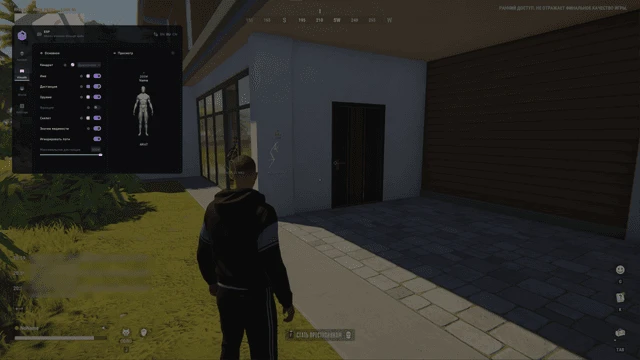
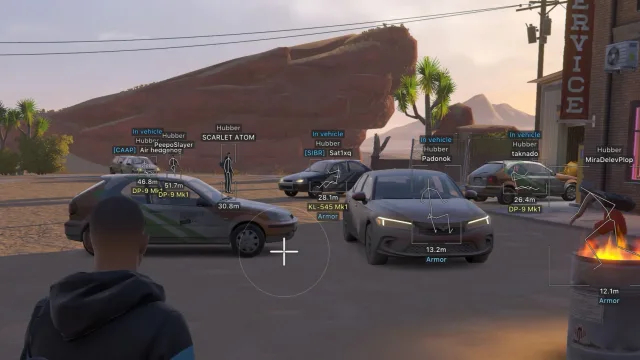
Mason Internal combines configurable Aimbot with ESP for players, NPCs and world objects. Aiming features include mouse movement calibration and weapon profiles. Chams, radar and combat mode let you tailor the display to the gameplay situation.
Aiming

  • Mouse calibration; separate activation and head-aim hotkeys
  • Hold-key, always-on or ADS-only mode; head targeting while holding Shift
  • Target lock, range, switch delay, smoothing and replay of recorded movement
  • Adjustable prediction time; police, robbers, civilians and NPCs
  • Exclude dead, downed and vehicle occupants
  • Head, neck, torso and pelvis; nearest point or multipoints with visibility checks

FOV and markers

  • Camera-adaptive FOV, area size, background and outline thickness
  • Locked-target marker and adjustable prediction marker

Calibration and weapons

  • Profiles for pistols, rifles and other weapon groups
  • Four stages of three movements; re-record, cancel and reset
  • Game and ADS sensitivity; resetting calibration disables dependent settings
  • No Recoil and No Sway suppress recoil and weapon sway

Players and NPCs

  • Separate role, visibility and range settings
  • Full and corner boxes, fill, gradients, skeletons, head circles and distance fading
  • Lines from the bottom, center or top; label backgrounds and skeleton thickness
  • Names, clan, role, state, ID, distance and held item as text or icon
  • Downed and passenger markers; hide dead players and allies; show your own character

Chams and colors

  • Solid, translucent or glowing highlights based on visibility
  • Separate colors and opacity for visible and hidden model parts
  • Colors for ESP elements, allies, downed players, vehicles, cameras and alarms; HEX and color picker

Vehicles and cameras

  • Vehicle name, owner, driver, speed and state
  • Occupied-vehicle filter; hide your own and current vehicle
  • Filled camera view cones; hide broken cameras

Loot and objects

  • Items, container contents, loot spots, cargo, cash and chargers
  • Weapon, ammo, armor, equipment, medical, consumable, key, tool and valuables categories
  • Sell price by quantity; container color based on the rarest item inside
  • Hide empty objects, icons, grouping and label limit
  • Detail distance and focus area around the crosshair

Radar and battle mode

  • Players and NPCs with role filters, names, distances and marker size
  • Edge markers, circular mode, repositioning and position reset
  • Configurable F6 hides NPCs, civilians, loot, cameras and view cones; press again to restore settings

Menu and configurations

  • Russian and English interface and search; mouse and keyboard hotkeys
  • Insert opens the menu, End stops the overlay, Ctrl+1…6 selects sections
  • Ctrl+click for exact values; Escape closes calibration or clears search and key binding
  • Create, save, load and delete INI profiles in C:\mason
  • Profiles include visuals, radar, language, weapons, aiming and calibration
System
Windows 11 x64; Windows 10 is not supported
Processor
Intel / AMD; Xeon and FX support is not guaranteed
Game
Steam
Display mode
Windowed / borderless / fullscreen
USB drive
Not required
Spoofer
Not required
Hidden from recording
Not provided

Store support

Message us using the chat widget in the corner of the page. If it has not loaded, refresh the page or check your content blocker.

Questions and answers
Enlarged image